From Website Hero Image to Wall Poster: Repurposing Visual Assets for Events and Pop-Ups
A strong website hero image does more than fill the top of a page. For a small business, studio, consultant, or local service brand, it often contains the clearest visual expression of the offer: the product in context, the mood of the brand, the promise behind the landing page, and sometimes the one image that visitors remember after they leave.
That same asset can keep working offline. When a business appears at a local event, a pop-up shop, a community fair, a workshop, or a retail counter, the visual language from the website should not disappear. Reusing hero images as large wall posters can make a temporary physical space feel connected to the online presence people already know.
Why a digital hero image can become useful offline
Website builders and landing page tools encourage teams to think carefully about the first screen: image, headline, call to action, trust signals, and brand tone. The work invested there is valuable. If the hero visual is already optimized to communicate quickly, it can also help a passerby understand a booth or display before anyone says a word.
This is especially useful for businesses that do not have a full trade-show budget. A single print-ready poster made from existing brand assets can add scale, recognition, and polish without commissioning a new campaign. The goal is not to paste a web page onto a wall. The goal is to adapt the strongest visual asset from the site into a format people can read from across the room.
Start with the right website asset
Not every hero image will work as a poster. Some are built as background texture behind text, some rely on a specific crop, and some are too low in resolution for large-format use. Before creating a wall display, choose an image that has a clear subject, enough breathing room around the edges, and a simple composition that still makes sense without the website copy layered over it.
- Use original image files when possible instead of screenshots from a website builder preview.
- Prefer simple, high-contrast compositions that remain legible from several feet away.
- Avoid images where important product details sit close to the crop edge.
- Check whether the image still supports the same conversion message as the landing page.
- Keep brand colors, photography style, and visual hierarchy consistent with the small business website.
Plan the poster before exporting
A poster has a different job than a hero section. On a web page, the image works alongside navigation, headlines, buttons, and scrolling content. In a physical space, the image may need to create atmosphere, direct attention, or make a small booth feel intentional. Decide what the poster should do before choosing its size.
For example, a workshop host might use a large visual backdrop to make photos look branded. A cafe testing a new catering offer might place a poster behind a sampling table. A local SaaS consultant might use a printed wall piece to make a modest event table feel more credible. In each case, the hero image becomes part of a larger customer journey that starts offline and returns online.
A practical sizing check
| Use case | Poster role | What to check |
| Pop-up retail table | Create a branded backdrop | Subject visible above products and table clutter |
| Workshop or class | Set the mood for attendee photos | Image has calm areas and no awkward crop |
| Local service booth | Explain the offer quickly | Visual connects clearly to the landing page promise |
| Office or studio wall | Extend the online brand into the room | Colors match the website and printed material |
Turn one large idea into printable pages
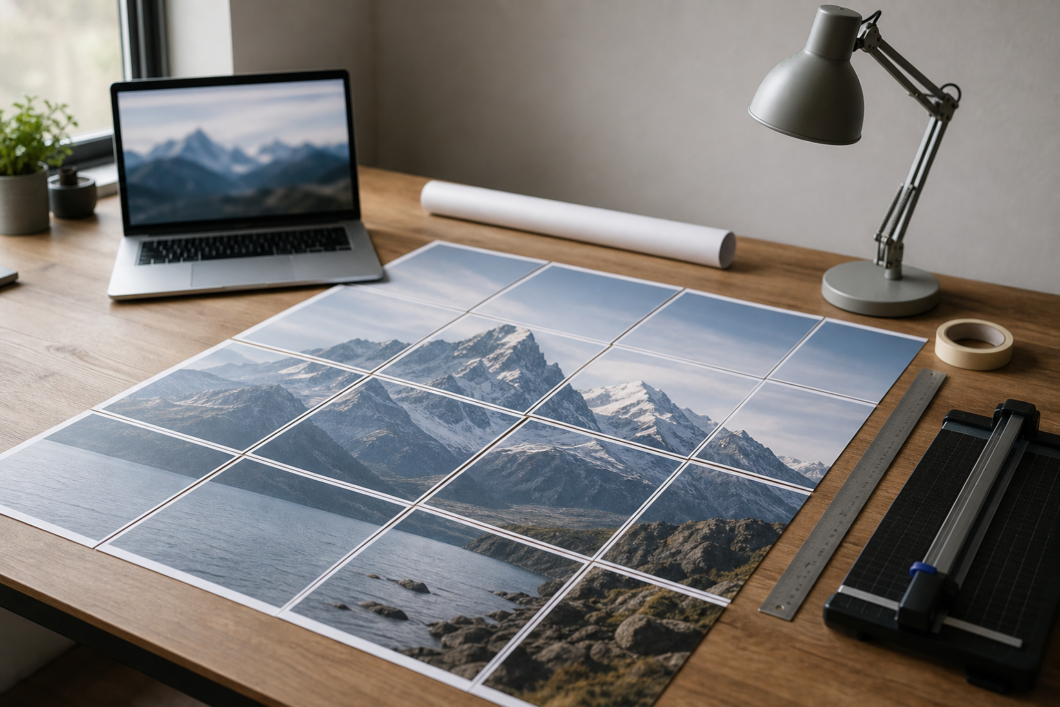
When a team wants to turn a website hero image or other visual content into a wall-scale print without a commercial large-format printer, Rasterbator can help split the image into printable tiled pages, making it easier to create an event poster from existing brand assets while keeping the landing page experience visually connected to the physical display.
This approach is useful when speed and flexibility matter. A tiled poster can be printed on standard office paper or local print-shop paper, then assembled on a wall, foam board, or temporary booth surface. It is not a replacement for every professional print job, but it gives small teams a practical option when they need a large visual quickly.
Prepare the image for better results
Before exporting, remove web-only elements that will not help the poster. Buttons, tiny trust badges, navigation bars, and overlay text often become clutter when enlarged. Keep the composition focused. If the image originally relied on headline copy, consider creating a clean version with the subject and brand colors only, then add any necessary copy separately in a layout tool.
- Find the highest-resolution source image used by the website or landing page.
- Crop for the physical space, not for the browser viewport.
- Export a clean image file with no small interface elements or web navigation.
- Test a small printed section before committing to the full wall poster.
- Assemble the tiled print carefully, using overlap and alignment marks if available.
Keep the offline path connected to conversion
A poster should not be decorative only. If the business has a landing page for the event, a booking page, a product launch page, or a lead magnet, the poster should support that next step. The image can create recognition, but the surrounding environment should still tell visitors what to do next.
That might mean placing a QR code on a nearby table card, matching the poster image to the landing page hero, or using the same product photography in follow-up emails. Consistency reduces friction. When someone scans a code after seeing the poster, the page they land on should feel familiar rather than like a separate campaign.
A simple web-to-event workflow
The easiest workflow is to begin inside the website project. Identify the strongest hero image, download the original file, create a poster-safe crop, export it at the best available quality, and test how it looks at the intended scale. Then assemble the printed version and view it in the actual event environment before visitors arrive.
For small businesses, this habit turns the website into a reusable brand system rather than a one-time digital surface. The same visual assets can support search traffic, social posts, event displays, sales conversations, and customer follow-up. A good hero image earns its place on the landing page. With thoughtful adaptation, it can earn a place on the wall too.